Published on
- 4 min read
CA2254, logging in C# and performance issues

What is CA2254?
CA2254 is an analyzer warning for Microsoft.Extensions.Logging. It says the following:
The logging message template should not vary between calls.
In simple words, the template text must be constant.
     // Bad
logger.LogDebug($"Request Id: {Id} finished with Error: {Error}");

// Better
logger.LogDebug("Request Id: {Id} finished with Error: {Error}", Id, Error);
Why is logging like this bad practice?
Because string interpolation is just syntactic sugar. After compilation, the code will look like this:
     // Before compilation
logger.LogDebug($"Request Id: {Id} finished with Error: {Error}");

// After compilation
var handler = new DefaultInterpolatedStringHandler(34, 2);
handler.AppendLiteral("Request Id: ");
handler.AppendFormatted(value);
handler.AppendLiteral(" finished with Error: ");
handler.AppendFormatted(value2);
string text = handler.ToStringAndClear();
logger.LogDebug(text);
The problem here is that the text string is always created, even if the logging level is higher than Debug and the log message would not be written. This leads to unnecessary memory allocations and performance degradation.
Will using templates help?
The correct way to write logging would be:
logger.LogDebug("Request Id: {Id} finished with Error: {Error}", Id, Error);In this case, the string template "Request Id: {Id} finished with Error: {Error}" will not be used if, for example, the minimum log level is set to Information.
This should avoid unnecessary allocations… or so I thought, until I wrote some benchmarks and checked the results.
How is performance affected?
If you run memory profiling, you can see that in both cases the Gen0 size keeps growing. When using templates, memory allocations are indeed lower (3.09 MB vs 8.22 MB), but they still happen.
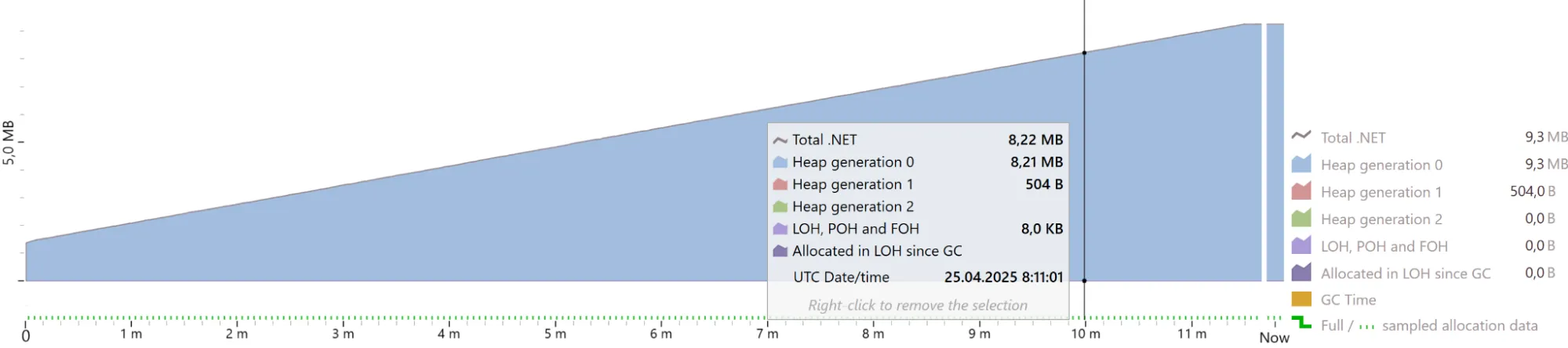
Memory profiling with string interpolation
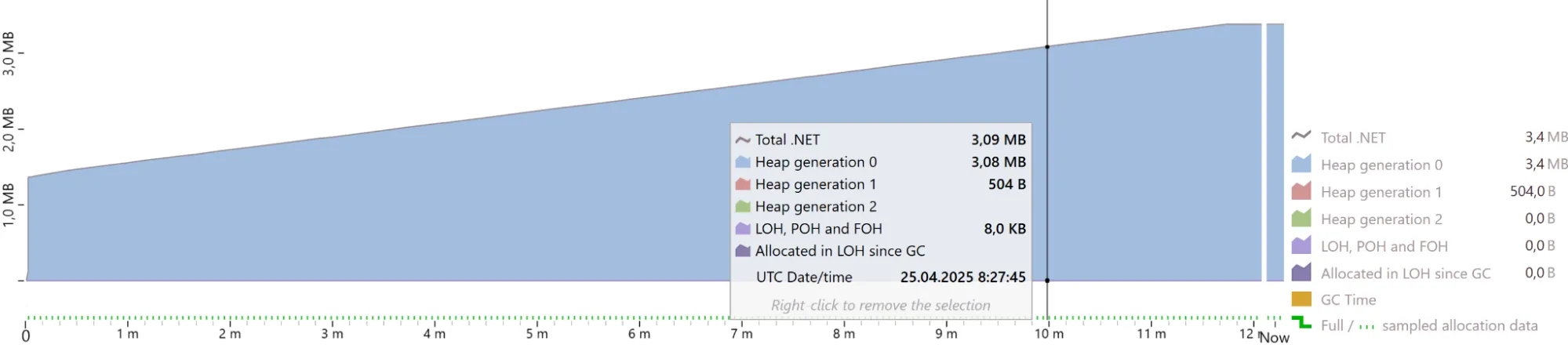
Memory profiling with templates
And this happens even if the current logging level is Information and we are calling LogDebug.
There are several reasons for this behavior.
Reasons for hidden allocations
Reason 1 — Use of params object[]
The extension methods from LoggerExtensions accept params object[]. Therefore, a new array is created on each logging method call.
Example:
     // Original code
logger.LogDebug("Integers: {i1}, {i2}, {i3}", 1, 2, 3);

// After compilation
object[] array = new object[3];
array[0] = 1;
array[1] = 2;
array[2] = 3;
logger.LogDebug("Integers: {i1}, {i2}, {i3}", array);
If you are logging value types (int, bool, struct), additional memory allocations happen because of boxing.
Reason 2 — Hidden allocations inside Logger
The LogDebug, LogInformation, LogError, and other methods internally call the Log method, where a FormattedLogValues structure is created:
     public static void Log(this ILogger logger, LogLevel logLevel, EventId eventId, Exception? exception, string? message, params object?[] args)
{
    ArgumentNullException.ThrowIfNull(logger);

    logger.Log(logLevel, eventId, new FormattedLogValues(message, args), exception, _messageFormatter);
}
Inside FormattedLogValues, there is a ConcurrentDictionary, which also causes allocations.
The constructor of FormattedLogValues:
     public FormattedLogValues(string? format, params object?[]? values)
{
    if (values != null && values.Length != 0 && format != null)
    {
        if (s_count >= MaxCachedFormatters)
        {
            if (!s_formatters.TryGetValue(format, out _formatter))
            {
                // Allocation
                _formatter = new LogValuesFormatter(format);
            }
        }
        else
        {
            // Allocation
            _formatter = s_formatters.GetOrAdd(format, f =>
            {
                Interlocked.Increment(ref s_count);
                return new LogValuesFormatter(f);
            });
        }
    }
    else
    {
        _formatter = null;
    }

    _originalMessage = format ?? NullFormat;
    _values = values;
}
Reason 3 — Logging level is not checked immediately
Before checking if the current log level is enabled, the runtime does a lot of work:
- creates
FormattedLogValues; - checks if the formatter template is cached;
- does some additional operations.
Only after that, it decides whether to actually write to the log or not.
Solution — Use LoggerMessageAttribute
Starting from .NET 6, C# has a LoggerMessageAttribute, which avoids all the problems listed above.
It works through source generators. Example:
     [LoggerMessage(Level = LogLevel.Debug, Message = "Integers: {i1}, {i2}")]
public static partial void LogIntegers(ILogger logger, int i1, int i2);
The compiler generates a strongly typed delegate and method body for LogIntegers:
     private static readonly Action<ILogger, int, int, Exception?> __LogIntegers1Callback =
    LoggerMessage.Define<int, int>(
    LogLevel.Debug,
    new EventId(666252842, nameof(LogIntegers)),
    "Integers: {i1}, {i2}",
    new LogDefineOptions() { SkipEnabledCheck = true });

public static partial void LogIntegers(ILogger logger, int i1, int i2)
{
    if (logger.IsEnabled(LogLevel.Debug))
    {
        __LogIntegers1Callback(logger, i1, i2, null);
    }
}
Main differences:
- The log level is checked immediately.
- Method signature and delegate types match the provided arguments exactly.
All of this improves performance. Instead of previous memory allocations, we get only 1.36 MB of Gen0 memory usage and it’s stable.
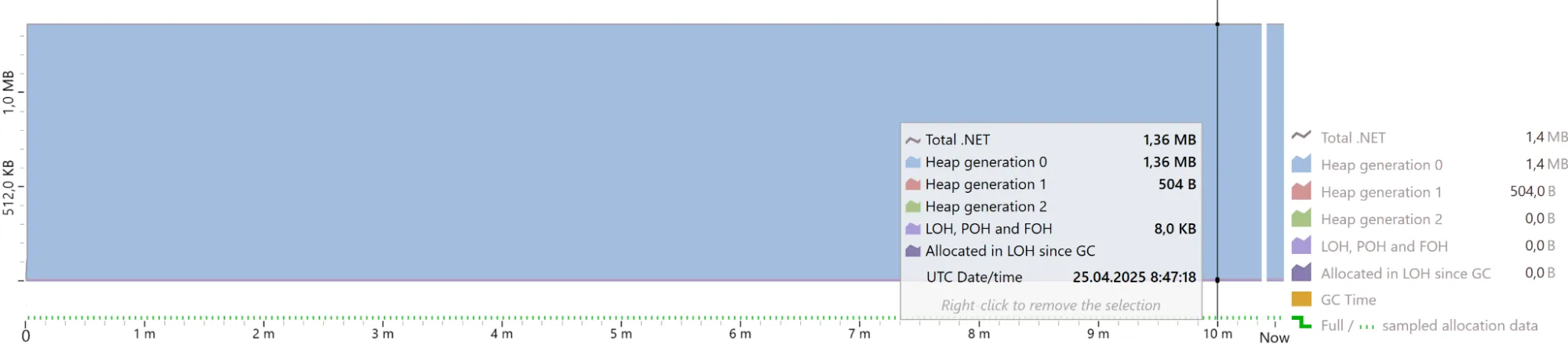
Memory profiling using LoggerMessageAttribute

Benchmark results
Conclusions
- String interpolation in logging leads to unnecessary memory allocations, even when the log level is disabled.
- Using templates reduces allocations but does not completely eliminate them.
- Reasons for hidden allocations: creation of
params object[], boxing of value types, creation ofFormattedLogValues, and dictionary lookups. - The most efficient way to log, in terms of performance, is to use
LoggerMessage, available since .NET 6. It minimizes allocations through code generation.
If you care about performance, especially in hot code paths — use the LoggerMessage attribute.