Published on
- 3 min read
PostgreSQL vs TimescaleDB: performance comparison
TimescaleDB is a popular PostgreSQL extension for working with time-series data. It has features that help optimize data storage and queries.
In this article, I compare the performance of TimescaleDB and regular PostgreSQL on a test analytical query.
Installing and running TimescaleDB in Docker
TimescaleDB has a ready-made Docker image. The configuration is similar to a regular Postgres database.
     # docker-compose.yml
services:
  timescaledb:
    container_name: timescaledb
    image: timescale/timescaledb:latest-pg17
    restart: unless-stopped
    shm_size: 1g
    ports:
      - 5432:5432
    environment:
      POSTGRES_DB: 'timescaledb'
      POSTGRES_USER: 'sa'
      POSTGRES_PASSWORD: 'qweQWE123!!'
      PGDATA: /var/lib/postgresql/17/docker
    volumes:
      - timescaledb_data:/var/lib/postgresql

volumes:
  timescaledb_data:
Run the database with this command:
docker compose -f docker-compose.yml up -dCreating a hypertable in TimescaleDB
Tables in TimescaleDB are called hypertables. They are created like regular Postgres tables with a small addition.
     CREATE TABLE billing_data (
    billed_cost numeric(25,15),
    charge_date timestamptz,
    resource_id int4)
WITH (
  -- Specify that this is a hypertable
    timescaledb.hypertable = true,
  -- Split the data into chunks of 1 day
    timescaledb.chunk_interval='1 day',
  -- Group the data by resource
    timescaledb.segmentby='resource_id'
  -- Sort the data by date
    timescaledb.orderby='charge_date'
);
What is a hypertable?
A hypertable is a special type of TimescaleDB table that automatically splits data into chunks, optimizes storage, and improves access for analytical queries.
How does data segmentation work in a hypertable?
TimescaleDB can use columnar storage (Hypercore), automatically splits the table into chunks, and keeps them up to date. The image is taken from the TimescaleDB documentation.
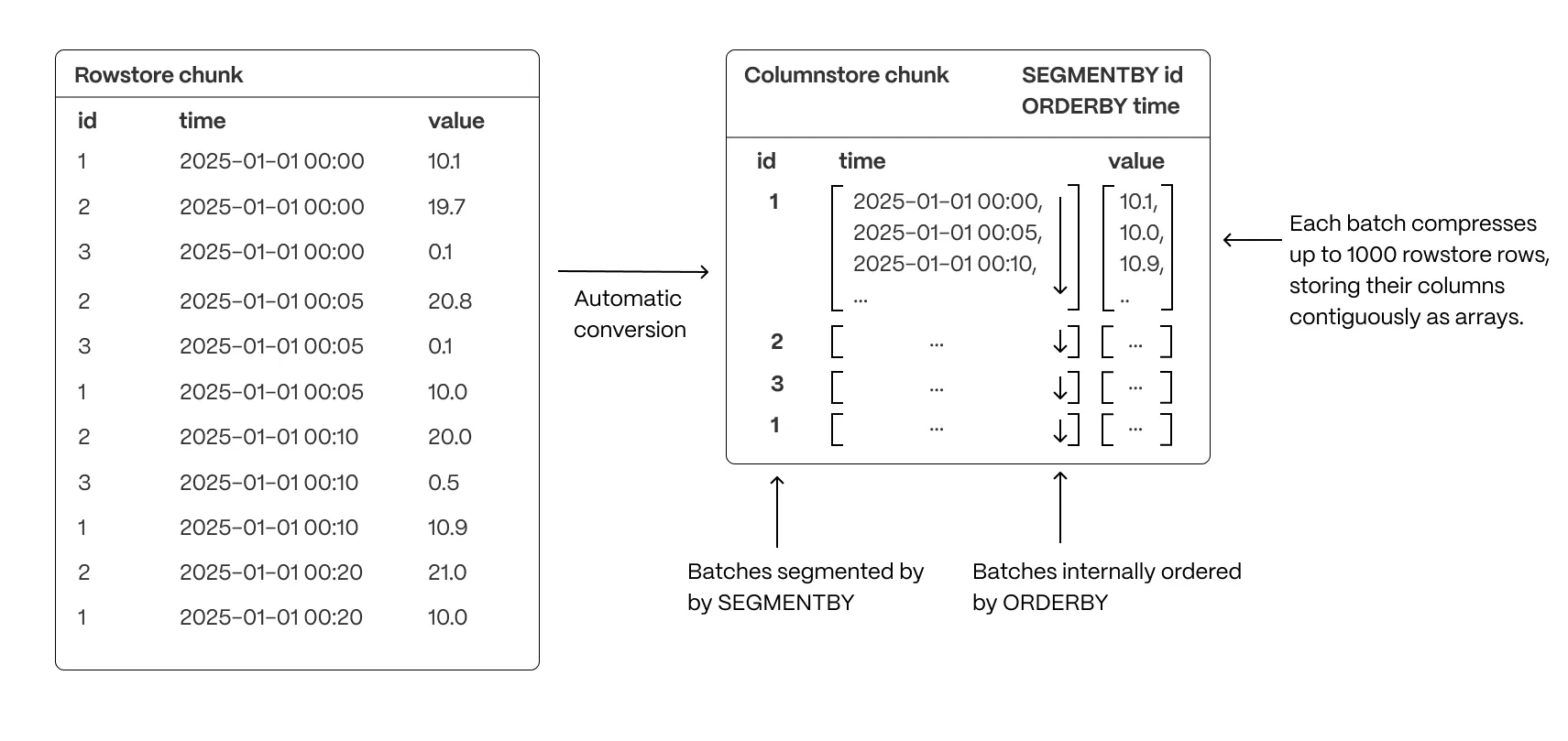
With enough data volume and when the number of unique resources is low (low cardinality), the performance of analytical queries on a hypertable can be much better than on a regular Postgres table. This happens because of higher data density and optimized data access.
Benchmark: comparing TimescaleDB and PostgreSQL
In the test analytical query, I calculated the daily cost of cloud resources for the last 30 days.
For benchmarking I used BenchmarkDotNet library. The benchmark source code is available in my GitHub repository.
     -- Postgres
SELECT
    date_bin('1 day', charge_date, TIMESTAMP 'epoch') AS day,
    resource_id,
    SUM(billed_cost) AS total_cost
FROM billing_data
WHERE charge_date >= now() - interval '30 days'
GROUP BY day, resource_id

-- TimescaleDB
SELECT
    time_bucket(INTERVAL '1 day', charge_date) AS day,
    resource_id,
    SUM(billed_cost) AS total_cost
FROM billing_data
WHERE charge_date >= now() - interval '30 days'
GROUP BY day, resource_id
How is time_bucket different from date_bin?
The time_bucket and date_bin functions are similar. They let you group data by custom time intervals. However, time_bucket is optimized for hypertables and can provide better performance in TimescaleDB.
Benchmark results
The benchmark results are shown in the chart below. The Y-axis is the median execution time, and the X-axis is the number of resources in the table.
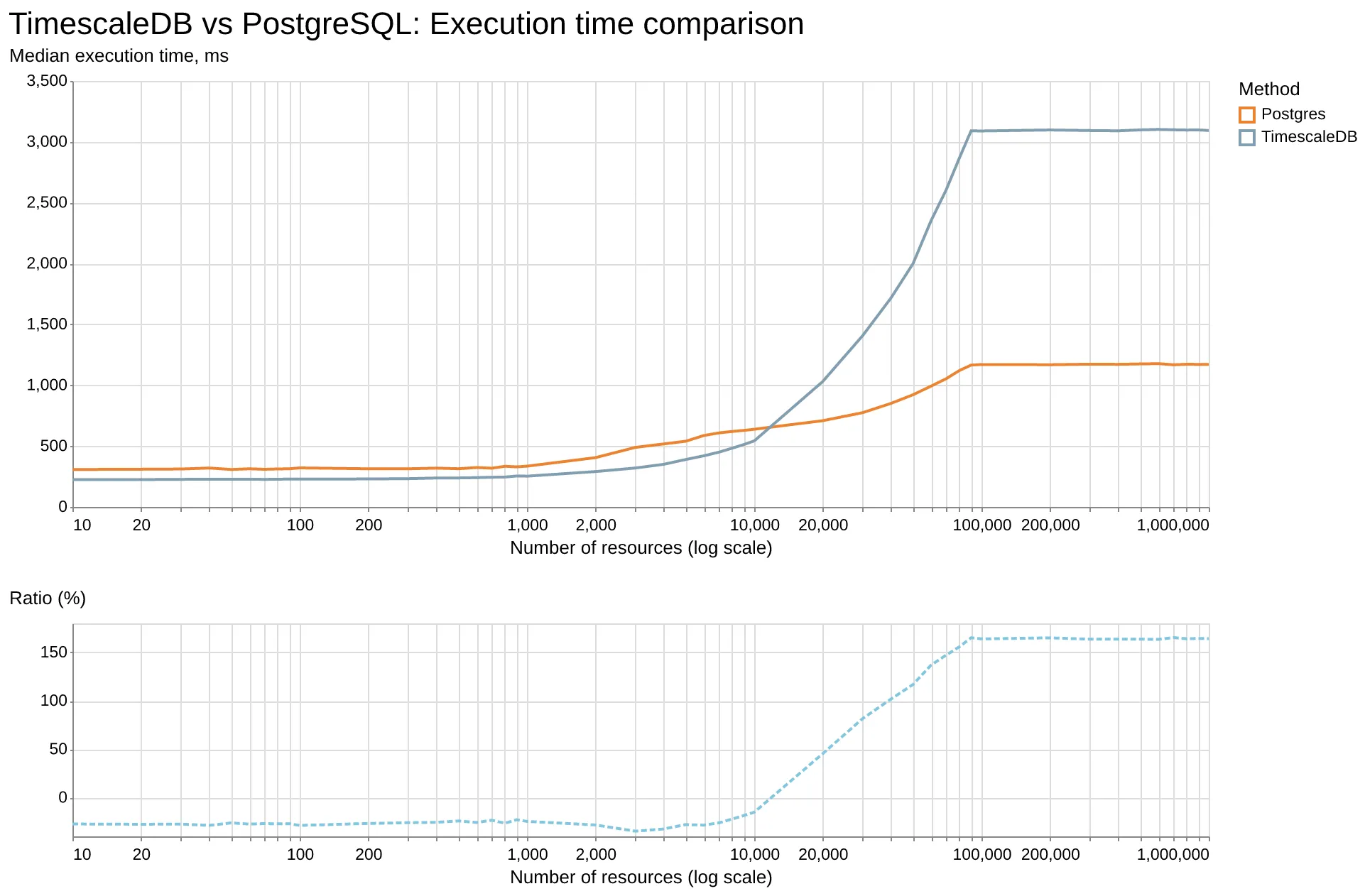
The table size was fixed at 1 million rows, and I changed only the cardinality by increasing the number of unique resources from 10 to 1 million. So the cardinality value depended on the ratio of unique resources to the amount of data.
As the results show, TimescaleDB performance is 15% to 28% better when the number of unique resources is low (up to about 10,000 unique resources, or about 100 rows of data per resource).
If the cardinality is higher (more than 20,000 unique resources), the query execution time becomes 45% to 165% worse.
Conclusion
TimescaleDB is a good fit for analytical queries if the data has low cardinality and sufficient volume. In such cases, it can provide a significant performance improvement compared to regular Postgres.
In the next posts, I will experiment with other data and queries to understand in which scenarios TimescaleDB can be especially useful.